Radius ZIP Code Search: A Practical Guide for Buyers
Learn how radius ZIP code search works, why installers appear in the results, and how to pick the right radius for your generator project.
You're at the kitchen table with a notepad, a phone, and a growing list of questions about a whole-house generator. You enter your ZIP code into an installer directory, choose a distance, and watch a blue circle appear around your area. One result is nearby, another is farther away, and you're left wondering why the “closest” company is 18 miles away or whether either business will come to your property.
A radius ZIP code search is useful because it narrows a large directory to a manageable geographic area. It isn't a recommendation engine, however. The search applies a location filter, measures distance, and returns matching businesses. You still need to check generator experience, service coverage, licensing, brands, and project fit before requesting an estimate.
Table of Contents
- What a Radius ZIP Code Search Actually Does
- The Building Blocks Behind Every Radius Search
- How a Directory Turns Your ZIP Into a Sorted List
- Choosing the Right Radius for Your Project
- Reading the Results Like an Experienced Buyer
- Where Radius Search Breaks Down
- A Simple Workflow From ZIP to Shortlist
What a Radius ZIP Code Search Actually Does
Think of a radius ZIP code search as a flashlight pointed at a map. Your ZIP code gives the flashlight a starting position, and the radius determines how wide the beam reaches. Businesses outside that illuminated area may be excluded, even if they could serve your property, while businesses inside it may appear even if they don't accept projects in your county.
The directory typically combines three pieces of information:
- Your ZIP code, converted into a geographic reference point.
- A selected radius, measured outward from that point.
- Installer locations, stored as business or service addresses in the directory.
The result is a list of installer records that fall within the selected distance. Many systems then sort those records from nearest to farthest, giving you a practical first pass through the local market. You're not browsing every electrician, HVAC contractor, or generator dealer in the state. You're viewing the businesses the system considers geographically close to one search anchor.
Practical rule: Treat the radius as a screening tool, not proof that an installer serves your address.
Suppose your home sits near the edge of a ZIP code and you search from its stored center. An installer located in a neighboring ZIP could be closer to your driveway than a company inside your own ZIP, so the list may reasonably show that business first. Distance alone still won't tell you whether the company installs standby systems, handles permits, performs maintenance, or travels to your property.
A directory such as the nearby generator installer search can help you create that first geographic shortlist. Once the list appears, your job shifts from finding names to verifying actual generator suitability.
The important distinction is simple. A radius search answers, “Which installer records are near this mapped point?” It doesn't answer, “Which contractor is the right choice for my generator project?” That second question requires evidence from the installer's website, service-area information, reviews, and a direct conversation.
The Building Blocks Behind Every Radius Search
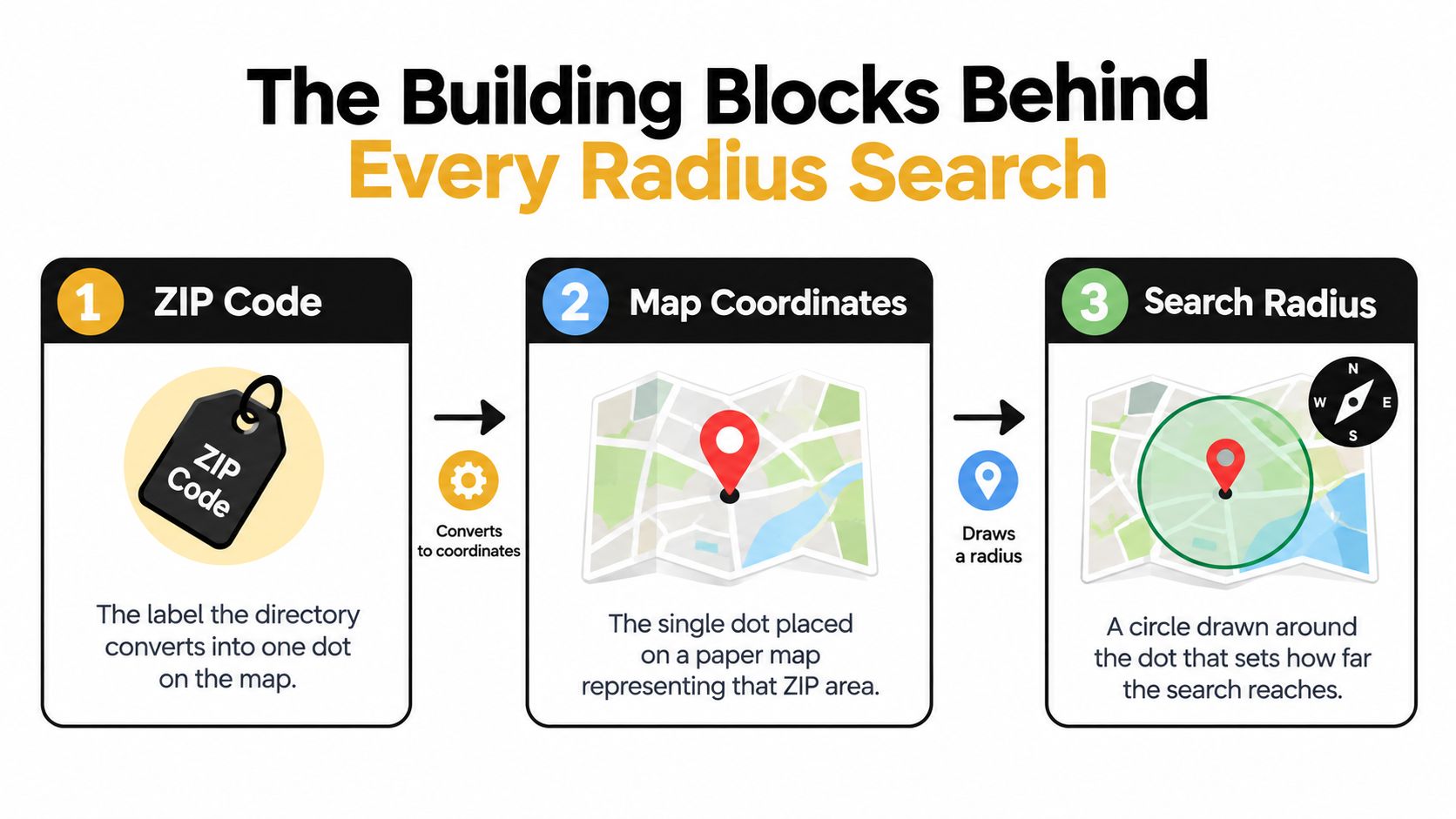
Start with a paper map and three items: a label, a dot, and a compass.
The ZIP code is the label. On a paper map, you might circle a ZIP code area with a pencil. A directory usually doesn't use that entire shape for a basic radius search. Instead, it converts the ZIP into one representative location. That location becomes the search anchor.
The map coordinate is the dot. The directory stores the anchor as geographic coordinates, commonly a latitude and longitude. For a first-time buyer, the technical term matters less than the mental model: your ZIP becomes one dot, not a complete outline of every road, neighborhood, and property inside the ZIP.
The radius is the compass arm. Set the compass to the distance you want, place its point on the dot, and draw a circle. Installer pins inside that circle become candidates for the results list.
Why the dot matters
A ZIP code is familiar to people because it describes a postal area. Software needs something more precise to perform a distance calculation, so it uses a geocoded point. That shortcut makes searches quick and consistent, but it also means the circle begins at the stored point rather than necessarily at your house.
An installer's location works the same way. The directory geocodes the business address or another recorded location into a pin. The search then compares your anchor dot with the installer pin. It doesn't automatically know whether the company's crews travel beyond the office, whether the business has multiple service territories, or whether a particular technician is available.
What appears inside the circle
The overlap between the search circle and an installer's mapped location determines eligibility for the list. A company can appear because its office pin falls inside the radius, even when its practical service area follows county boundaries or driving routes instead of a perfect circle.
That's why a useful search produces candidates, not conclusions. First understand the map logic. Then check whether each candidate's real coverage and generator capabilities match your property.
How a Directory Turns Your ZIP Into a Sorted List
The screen may update in seconds, but the directory is completing a sequence of location and filtering tasks behind the scenes.
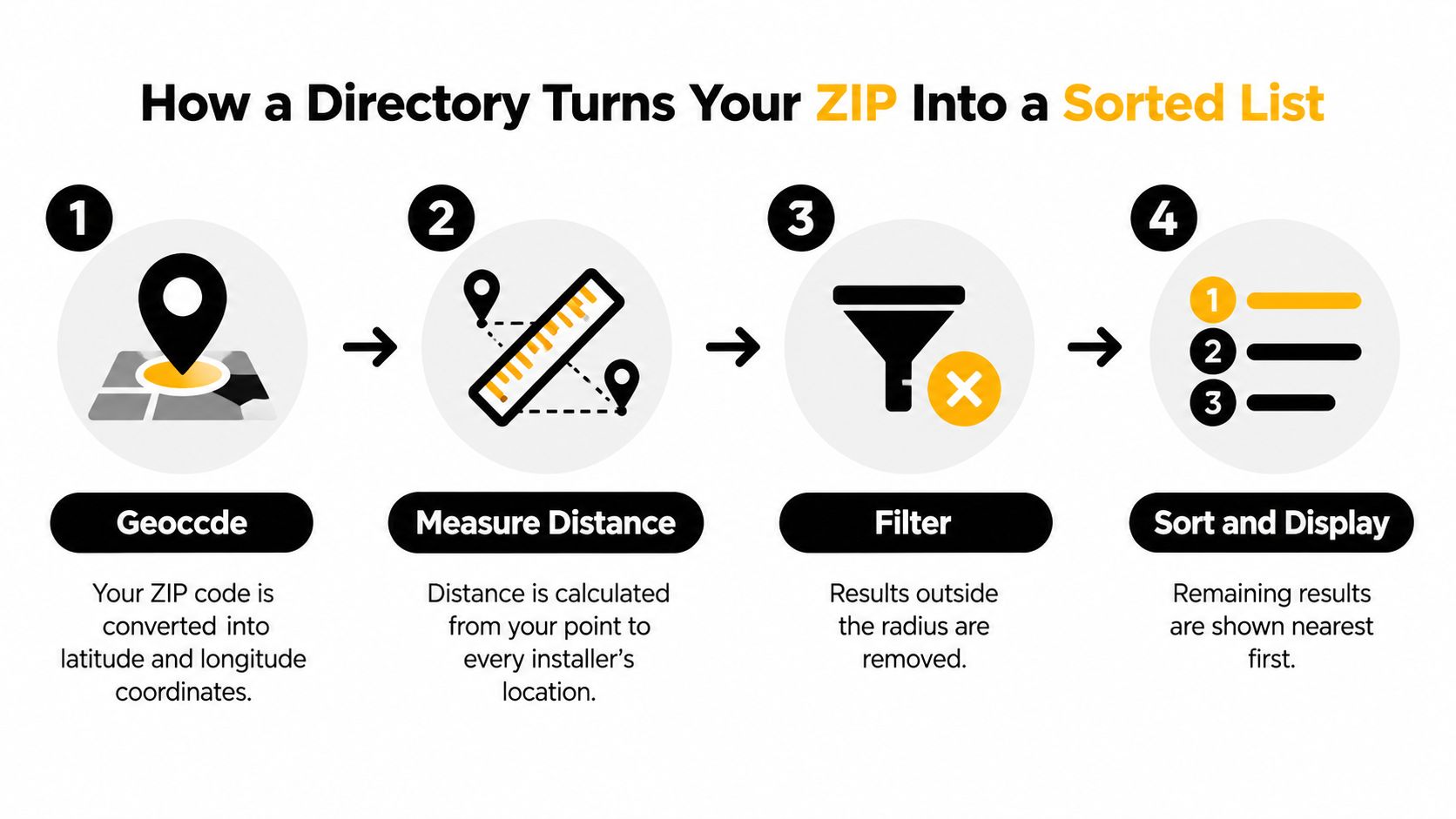
Step one creates the buyer anchor
You type a ZIP code and the directory looks up a corresponding geographic location in a postal reference dataset. The system represents that location with latitude and longitude. A basic search therefore begins with one coordinate pair rather than a detailed polygon describing every inch of the ZIP.
Step two places installers on the same map
The directory applies a similar process to each installer record. A listed business address, service address, or researched location is converted into coordinates. Each company becomes a pin that can be compared with the buyer's anchor.
Step three measures straight-line distance
The system calculates the distance between the two points. Many radius tools use a great-circle method such as the Haversine formula, which measures the shortest path across the surface represented by the map. This is a geometric distance, not a route produced by a driving-navigation application.
Step four filters and sorts
After measuring the installer pins, the directory removes records beyond the selected cutoff. It then commonly sorts the remaining entries from nearest to farthest before displaying them on the page.
That explains a result that says an installer is close while your navigation app shows a longer trip. A straight line can cross a river, mountain, restricted road, or large interchange. The actual drive may take much longer than the displayed distance, especially in rural areas or regions with limited road connections.
The number beside an installer tells you where the mapped pin sits, not how long a technician will spend reaching your driveway.
Use the distance column to organize your calls. Don't use it as a promise about travel time, response speed, or service availability. For additional buyer guidance on generator selection and contractor conversations, browse the generator installation guides.
This short video gives another visual way to understand how geographic search tools turn a location into a filtered map:
Choosing the Right Radius for Your Project
A small radius favors proximity. A large radius favors choice. Neither is automatically better, because the right setting depends on the property, the generator project, and the service relationship you expect after installation.
A homeowner arranging a residential standby system will often begin with a 25-mile radius. That setting keeps the first list focused on companies that may be familiar with local permitting, neighborhood conditions, and nearby utility requirements. It also makes an in-person site visit easier to imagine. The result may be short, especially outside a dense market, but a short list can save time when each company needs careful review.
A 50-mile radius makes more sense when the property is rural, sits near a county line, or has fewer generator specialists nearby. It can introduce regional dealers alongside local crews. That gives you more potential brand and technical coverage, although you'll need to ask about travel policies, site-assessment availability, and follow-up service.
A 100-mile radius is more useful for commercial properties, multi-site portfolios, or coverage deserts. It can expose companies that travel for larger projects, but the list may include businesses with longer lead times or limited routine service near the property.
| Radius | Best For | Typical Result Mix | Trade-Off |
|---|---|---|---|
| 25 miles | Homeowners who prioritize nearby visits and local familiarity | Local installers and smaller service-area businesses | The list may miss qualified regional providers |
| 50 miles | Rural homes, second properties, and county-edge locations | Local crews mixed with regional dealers | More calls are needed to confirm travel and maintenance coverage |
| 100 miles | Property managers, commercial buyers, and sparse markets | Traveling sales offices, regional contractors, and broader dealer networks | Distance may affect site visits, response expectations, and follow-up service |
Public tool documentation illustrates why list size can change sharply with geography. A 10-mile search may return 40 to 100 ZIP codes, while a 50-mile search may return 200 to 600 ZIP codes, depending on density, as described by ZIP-radius search documentation. Those figures describe ZIP-code outputs, not qualified generator installers, but they show why expanding a radius can quickly increase the amount of sorting work.
Choose the narrowest radius that gives you credible options. Widen it when the list is thin, not just because a larger circle feels more complete.
Reading the Results Like an Experienced Buyer
Distance should be your opening filter, not your final judgment. Start near the top of the list, but read each entry as if you're checking a job application. The business name and location tell you where the record sits. The rest of the profile should help you decide whether the company deserves a call.
Look for evidence of the right work
A generator installer's profile should connect clearly to your project. Look for a dedicated standby-generator page, whole-house installation language, maintenance information, and details about the brands or system types the company supports. A general electrical business may be excellent at wiring but may not offer complete generator installation, commissioning, or ongoing service.
Use these signals to separate promising entries from vague ones:
- Project language: Does the company discuss standby, whole-house, automatic backup, transfer switches, or generator maintenance?
- Service-area language: Does it name your town, county, or surrounding communities?
- Brand fit: Does it work with the manufacturer you're considering, such as Generac, Kohler, Cummins, or Briggs & Stratton?
- Business focus: Does the company appear oriented toward residential work, commercial facilities, or a mix that fits your property?
- Credential information: Does it identify relevant licensing or registration details that you can verify with the appropriate authority?
A result with a slightly greater distance may be more useful than the closest listing if it clearly describes standby-generator work in your area. Conversely, an impressive-looking company may still be a poor match if it only sells equipment or doesn't provide local service.
Build a call order
Put the strongest candidates into three groups. Call nearby companies with clear generator evidence first, then regional providers with a stated service area, followed by businesses that look promising but require basic confirmation. Keep notes about who answered, which counties they cover, whether they perform site assessments, and what information they need before preparing a quote.
Don't spend your early calls on generic directory pages, broad business listings, or profiles with no generator-specific language. Before you contact anyone, use the questions to ask a generator installer to prepare a consistent checklist.
The goal isn't to find the profile with the smallest mileage number. It's to find a contractor whose location, technical scope, service territory, and project experience fit together.
Where Radius Search Breaks Down
A ZIP code has an area, but a basic radius search often treats it like a point. That difference creates the most important source of confusion for buyers who assume the circle begins at their actual address.
ZIP codes are designed around mail delivery routes, not precise geometric boundaries. Radius tools commonly calculate distance from a selected center point or ZIP Code Tabulation Area centroid, then return ZIPs or businesses within the requested distance, as explained in this overview of ZIP-code radius search. If your property sits near the edge of a large rural ZIP, the stored center may be far from your driveway.
The closest pin may not be the closest workable option
Consider a property located near a county boundary. The search center may place your home several miles away from its stored position, while an installer across the county line appears close to the ZIP center. The result list may be mathematically consistent and still fail to reflect the trip a technician would make from the company's office to your property.
The installer's own coverage rules add another layer. Companies often define service areas by counties, dealership territories, technician availability, or practical driving limits. A business can be geographically nearby but decline the project, while a regional installer farther away may routinely serve your county.
Correct the map with direct questions
When results seem thin or strangely ordered, run the search again from a neighboring ZIP. Compare the lists, then inspect each company's service-area page. Ask directly:
- Does the company serve your exact county and town?
- Does it install at your property type?
- Does it provide maintenance after commissioning?
- Does it charge for travel or site assessment?
- Who handles warranty visits if the system needs attention?
For higher-precision applications, boundary polygons can identify partial overlap between a ZIP area and a search circle instead of relying only on the ZIP's center point. Technical documentation describes polygon matching as more complete but computationally heavier than centroid mode, which is why a fast directory search should still be followed by human verification.
A Simple Workflow From ZIP to Shortlist
You don't need to master geospatial software to use a radius search well. A repeatable buyer workflow can take you from one ZIP code to a focused list of installers without treating the map as the final answer.
Enter the ZIP closest to the property. Use the property's location, not your office ZIP or a nearby city that seems more recognizable. The search anchor should represent the generator site as closely as possible.
Start with a 25-mile radius. This gives you a focused first view of nearby candidates. Read the profiles before expanding the map.
Widen the search when the list is thin. Move to 50 miles, then 100 miles if the market requires it. A wider radius can uncover regional providers, but it also increases the need for service-area checks.
Filter for the actual project. Apply standby or whole-house signals, relevant brand filters, residential or commercial focus, and any available service or maintenance indicators. Don't let a general contractor remain on your shortlist only because its office is nearby.
Sort by distance, then qualify by evidence. The distance order gives you a sensible call sequence. It doesn't replace checking the company's website, service territory, project scope, or credentials.
Scan for local coverage clues. Look for your county, town, nearby communities, and language about site assessments or maintenance. If the profile is unclear, mark it as a verification call rather than a confirmed match.
Shortlist three installers and contact them. Ask each company whether it serves the address, what installation work it performs, which brands it supports, and how it handles future service. Request comparable quote details so equipment, labor, permits, electrical work, and maintenance aren't mixed together.
A narrow search can miss a qualified provider just outside the circle. A broad search can bury practical options under companies that don't really travel to your property. The best process adjusts the radius and the interpretation together.
For contractors managing dispersed service territories, buyers may also find it useful to understand best route optimization for HVAC techs, because route planning helps explain why an installer's official coverage may not follow a perfect circle on a map.
Before booking a site assessment, confirm the service area by phone. Ask the installer to repeat the property address, identify the crew responsible for the visit, and explain what happens after installation if the generator needs maintenance or warranty support.
GeneratorInstallerList helps buyers search a researched directory of standby and whole-house generator installers by ZIP and radius, then review generator-specific signals, service language, and brand information. Visit GeneratorInstallerList to turn your radius search into a practical shortlist and begin contacting installers that fit your property.
- radius zip code search
- ZIP radius
- generator installer
- standby generator
- local search
Ready to find who to call?
Open your state page or search by ZIP for a distance-sorted list.