Whole House Generator Sizing Calculator Guide
Use our whole house generator sizing calculator to find the right kW. Learn running vs starting watts, load math, and worked examples.
The power goes out during a storm, and your family starts switching things on almost by habit. The refrigerator begins cooling, the sump pump starts moving water, the furnace blower comes on, and someone reaches for the central air conditioner. The generator starts, stumbles, and shuts down. Nothing was obviously excessive, yet the system couldn't handle the moment when a large motor demanded its startup surge.
That's the problem a whole house generator sizing calculator should solve. It isn't just an appliance wattage adder. A useful calculator analyzes running demand, motor inrush, simultaneous use, service size, fuel, and operating headroom. The result is an informed sizing target, not a substitute for an electrical inspection, transfer-switch design, or final installer approval.
Table of Contents
- How This Whole House Generator Sizing Calculator Works
- Calculator Inputs Explained and Where to Find Them
- Running Watts Versus Starting Watts and Why Surge Controls Size
- Choosing Your Coverage Level From Essential Circuits to Whole Home
- Step by Step Load Calculation Behind the Calculator
- Service Size Transfer Switch and Fuel Considerations That Affect Final kW
- Worked Examples for Small Medium and Large Homes
- Quick Reference Tables Cross References and Next Steps
How This Whole House Generator Sizing Calculator Works
A homeowner often begins with a simple question: “How many watts do all my appliances add up to?” That's a reasonable starting point, but it misses the electrical event that causes many sizing mistakes. Motors can demand three to six times their running watts at startup, so a central air conditioner, well pump, or other compressor may control the generator size even when the home's ordinary running load looks moderate. Voltage Lab's generator sizing guidance explains why both steady demand and inrush surge belong in the calculation.
What the calculator is actually doing
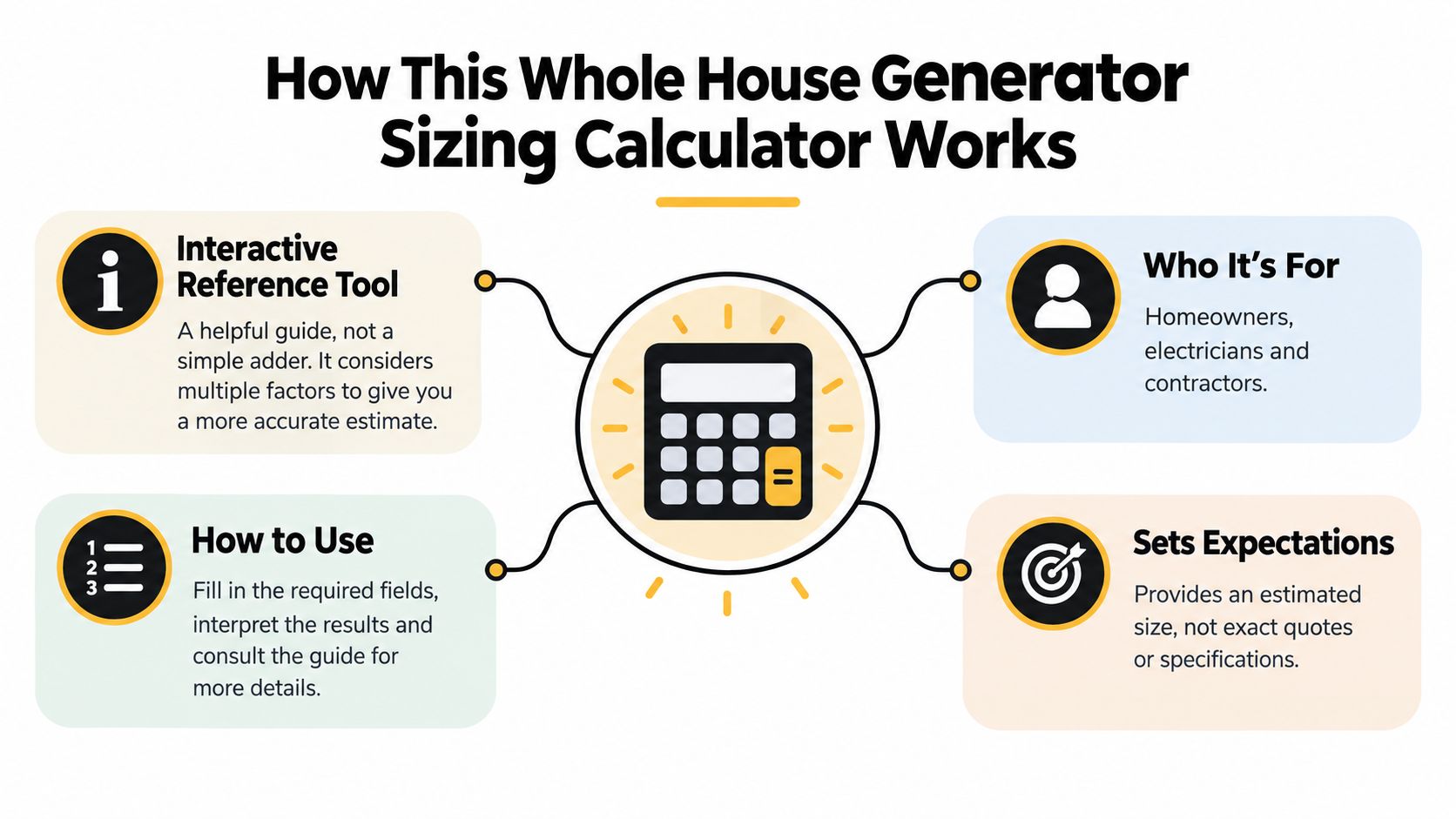
Think of the tool as a conversation with an electrician. It asks what your home can draw continuously, which motor has the largest starting requirement, how much equipment may operate at once, and whether the generator will serve selected circuits or the complete service. It then turns those inputs into a generator capacity target that you can discuss with a qualified installer.
The tool is useful for:
- Homeowners: Build a realistic equipment list before requesting quotes.
- Electricians: Organize customer information before completing a formal load calculation.
- Contractors: Compare coverage options, load management, fuel choices, and equipment families.
A result can still be wrong if the inputs are optimistic. Entering only refrigerator, lights, and television loads while intending to run central air conditioning produces a misleading answer. The calculator needs the loads you expect to use together, not every device you own and not only the easiest nameplates to read.
How to use the result
Start with the inputs in the next section. If a value is unclear, mark it as unknown instead of guessing confidently. Then review the surge explanation, follow the hand calculation, and compare your target with the worked examples.
For an existing home, recorded demand can provide a stronger foundation than nameplate totals. Guidance based on NEC optional calculation methods and measured usage points to NEC 220.82 for residential optional-method calculations and NEC 220.87 for existing homes using measured history. A qualified professional should decide which method applies and verify the final design.
Practical rule: Use the calculator to prepare for a sizing conversation. Use the electrician's load calculation and site inspection to approve the equipment and installation.
Calculator Inputs Explained and Where to Find Them
Before entering anything, separate the calculator's questions into distinct jobs. One input describes the electrical service, another describes steady demand, and another identifies the motor that creates the largest startup challenge. Treating them as interchangeable is the fastest way to get a poor result.
Service size
Read the rating on the main breaker in your electrical panel. It may also appear in your electrical records or utility documentation. The service rating doesn't tell you the generator's exact kW requirement, but it matters because a full-service transfer switch must be suitable for the complete main service rating when it switches the entire service. Transfer-switch installation guidance can help you understand why this panel detail affects the installation.
Total running watts
List the equipment you want powered and record each item's continuous wattage from its nameplate, manual, or manufacturer data. Include refrigerators, freezers, lighting, control systems, furnace blowers, pumps, HVAC equipment, cooking appliances, water heating, laundry equipment, and charging equipment when applicable.
If a nameplate gives amps instead of watts, you need the voltage before converting. Wattage depends on both current and voltage, so don't treat an amp value as though it were already a watt value.
Largest motor starting watts
Look for locked-rotor, starting, or surge information on the motor or appliance documentation. Central air compressors, well pumps, sump pumps, refrigerators, and other compressor-driven equipment deserve particular attention. The relevant question isn't “Which appliance is largest?” It's “Which motor creates the largest startup demand?” See the next section for the reasoning behind this input.
HVAC type
Record whether heating and cooling are gas, propane, electric, heat pump, central air, or another configuration. Find the model number on the outdoor condenser, indoor equipment, or system paperwork. A gas furnace may still need electricity for its blower and controls, while electric heat or a heat pump can create a much larger electrical requirement.
Pumps, cooking, water heating, and future loads
Check the motor plate for a well or sump pump. Read wattage information on the electric range, oven, dryer, and water heater. Add an EV charger, workshop equipment, planned addition, or other future circuit only if you have a realistic installation plan. Don't use a vague allowance to hide missing data. Identify the uncertainty so the installer can resolve it.
Running Watts Versus Starting Watts and Why Surge Controls Size
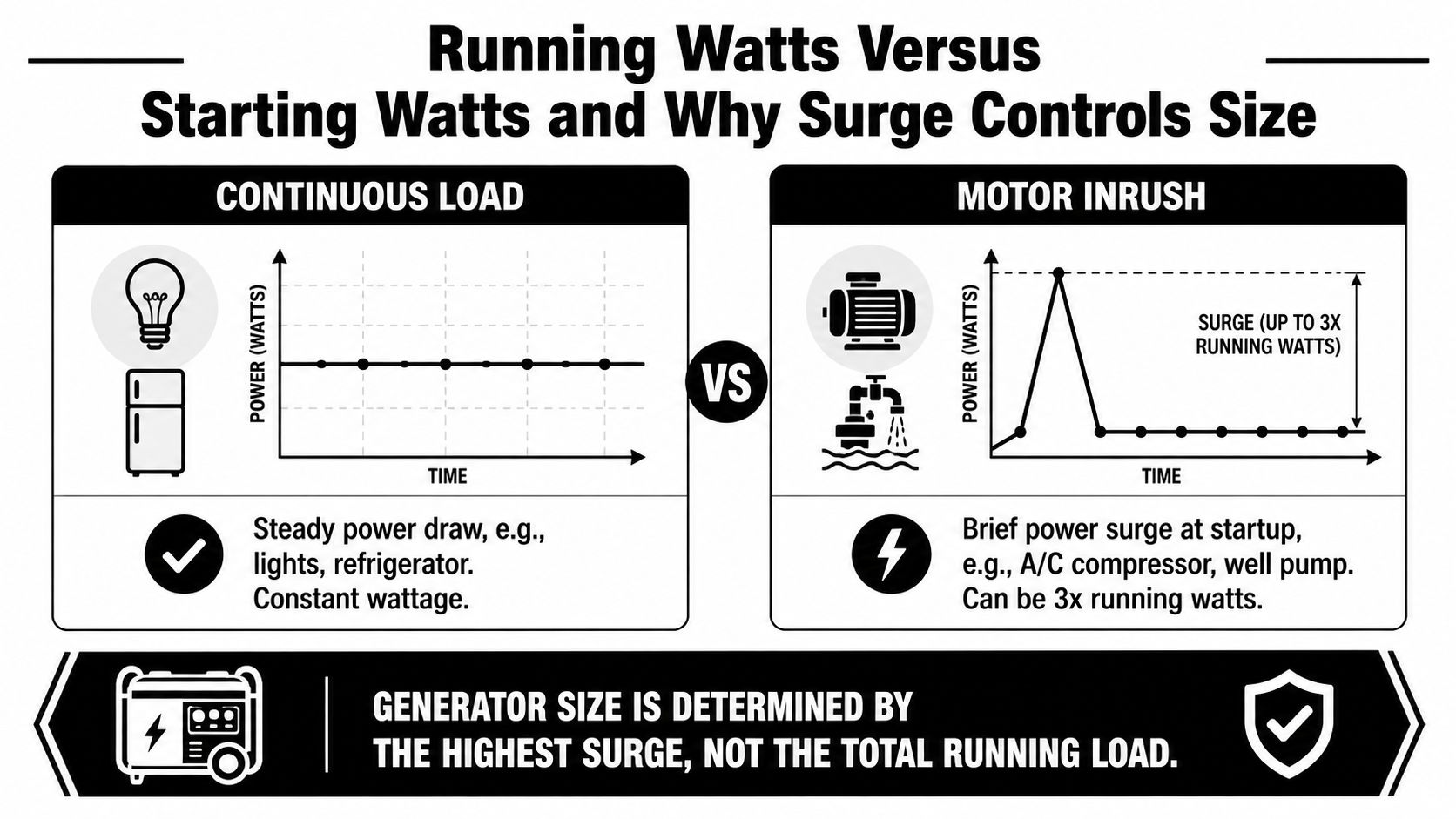
Running watts are the power an appliance needs after it has started. Starting watts are the short, higher demand required to bring a motor up to speed. Lights, controls, and many electronic devices tend to present a steadier demand, while compressors and pumps can create a sharp electrical event during startup.
Why one motor can change the answer
Suppose the home's selected appliances need a moderate continuous load. A central air conditioner may already be included in that running total, but its compressor can briefly demand far more when it starts. The generator has to support the other running loads and the additional startup requirement at that moment.
The same issue appears with a well pump or sump pump. These motors may operate normally once running, yet the generator must produce enough capacity when the motor starts. That's why a calculator asks for the largest motor starting watts, rather than adding every possible surge together without context.
A practical calculation uses the largest controlling surge alongside the running load. It doesn't normally assume that every motor starts at the exact same instant, but multiple motors, poorly controlled sequencing, or uncertain nameplate data may justify a more conservative design.
Simultaneous use matters
Connected load and simultaneous demand aren't identical. Your home may contain an electric dryer, range, water heater, EV charger, air conditioner, and well pump, but you may not use all of them at the same moment. The calculator should reflect the operating pattern you want during an outage.
That doesn't mean you should exclude inconvenient appliances. If the goal is true whole-home operation, the electrical design must address those loads through capacity, scheduling, or load management. If you choose essential circuits, the panel configuration can exclude selected equipment from backup.
The transfer switch also belongs in this discussion. Industry guidance says it should be rated for at least the maximum calculated load, and a switch serving the full service must meet the main service rating. This video demonstration of generator load behavior provides useful visual context, but it doesn't replace the nameplate information and calculations for your home.
For installation cost context, review the whole-house generator cost guide after you have a realistic capacity target. Equipment size, transfer equipment, site work, fuel work, and electrical labor all depend on the final design.
Choosing Your Coverage Level From Essential Circuits to Whole Home
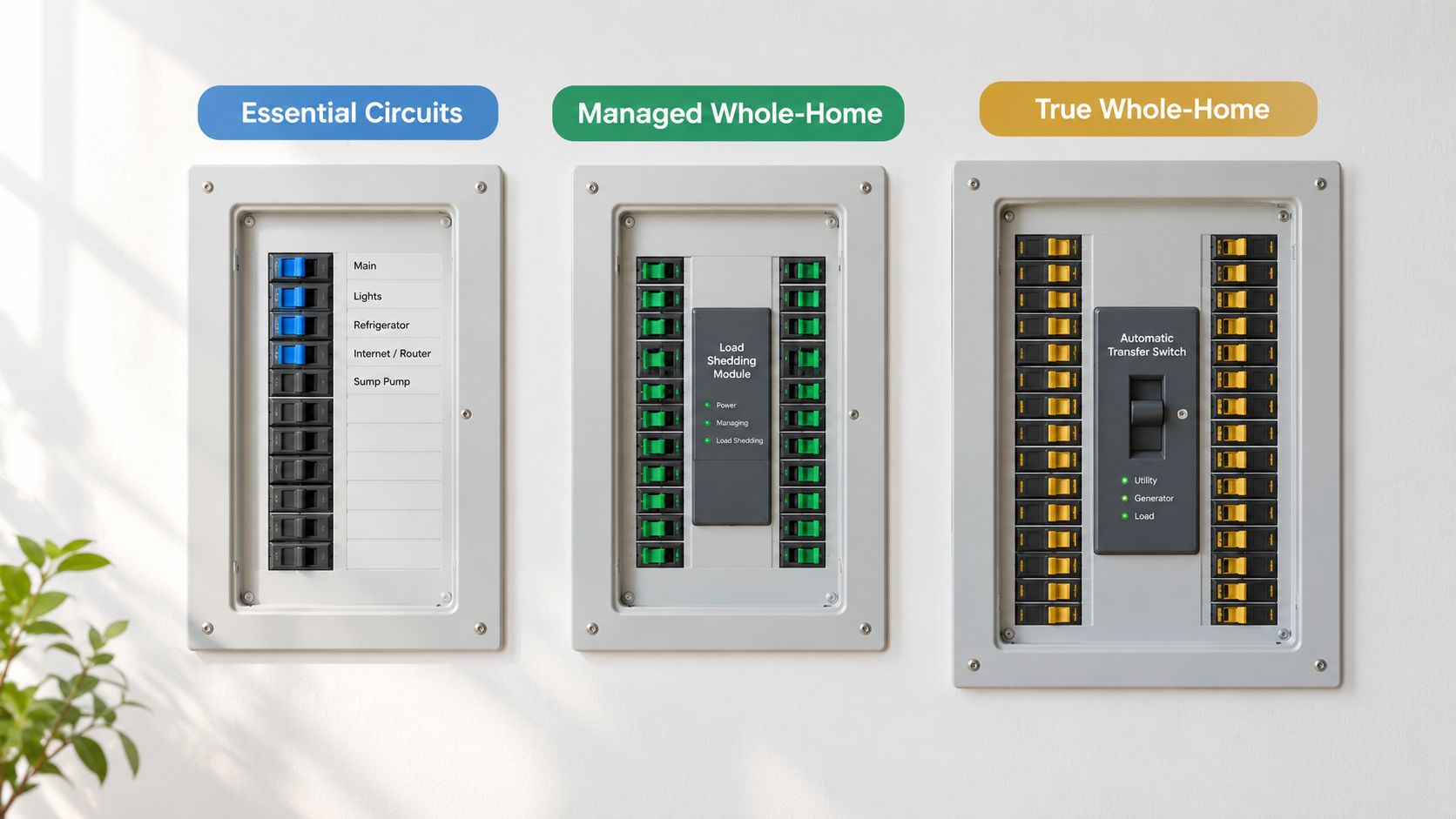
“Whole house” can mean different things at the kitchen table. One homeowner may mean refrigerator, furnace, internet, lights, and pumps. Another may mean every circuit, including central cooling, cooking, laundry, water heating, and vehicle charging. The calculator can't choose that definition for you.
Essential-circuit backup
This design powers a selected group of circuits. Homeowners commonly prioritize refrigeration, heating controls, lighting, communications, medical equipment, sump pumps, and well systems. Large discretionary loads remain off unless the installer includes them in the backed-up panel.
The generator target is often lower because the calculation excludes equipment you won't operate during an outage. You still need to account for motor startup, especially if a pump or HVAC circuit is essential.
Managed whole-home backup
Load management allows selected equipment to operate without requiring every large load to run simultaneously. The system may prevent an electric water heater, dryer, or cooling compressor from starting while another priority load is active. This approach can reduce the generator capacity required for the operating pattern, but the controls, sequencing, and priorities must be designed correctly.
True whole-home coverage
A full-service system is intended to energize the home through a transfer switch serving the complete service. The generator and switch must be compatible with the calculated demand, service arrangement, fuel supply, and installation requirements. Large HVAC systems and all-electric appliances can push the target higher than a gas-heated home with limited simultaneous use.
Use these questions to choose a mode:
- Must-run loads: What must operate automatically during an outage?
- Comfort loads: Do you need central cooling, electric cooking, and laundry at the same time?
- Priority conflicts: Which loads can wait if a motor starts?
- Future plans: Will an EV charger, addition, or electric appliance change the demand?
A smaller generator isn't automatically a compromise, and a larger generator isn't automatically the safer choice. The right answer matches the coverage promise to the control strategy and the loads you'll use.
Step by Step Load Calculation Behind the Calculator
You can test the calculator's logic at the kitchen table with a load list and a calculator. The exercise is not a substitute for an electrical design. It helps you see whether the result follows from your selected coverage, simultaneous use, and motor-starting demands, and it shows which input needs verification.
Start with the running load
Begin with the equipment that may operate at the same time within your chosen coverage level. Add its running watts. An essential-circuit design should include only those circuits, while whole-home coverage requires a broader list of appliances and systems.
Keep the units consistent. If the list is in watts, divide the final figure by the appropriate conversion factor to compare it with a generator rating in kilowatts.
Add the controlling motor surge correctly
Find the largest motor-starting requirement, such as a compressor or pump. Add only the extra watts needed during startup. Do not count that motor's normal running watts twice.
The hand formula is:
Peak demand = total simultaneous running watts + largest motor starting watts − that motor's running watts
For example, if the running total already includes a compressor operating normally, add the difference between its starting demand and running demand. That difference represents the temporary burden placed on the generator while the motor starts.
Several motors can complicate the picture. If they may start together, review their control sequence, transfer-switch behavior, motor data, and any load-management plan with the installer. A tidy spreadsheet is only as reliable as the starting information behind it.
Apply headroom and select a standard rating
After calculating peak demand, add operating headroom before choosing a generator. The whole-home load-analysis guidance describes adding a margin of 20% to 25% and rounding up, rather than running continuously at the calculated limit.
A separate sizing approach uses a year of billing history or a 30-day measurement period, then applies a 125% factor before rounding up to the next standard generator size. Norwall's standby-generator sizing guide explains how measured peak use can connect actual demand with generator selection.
Follow the calculation in this order:
- Define coverage: Choose essential circuits, managed whole-home, or full-home service.
- Add simultaneous running load: Use measured values when they are available.
- Identify the largest motor: Confirm its starting requirement from dependable equipment data.
- Calculate peak demand: Add only the motor's incremental startup demand.
- Add margin: Leave room for normal variation and reasonable future circuits.
- Round upward: Choose the next standard kW rating, then verify fuel performance and installation compatibility.
Headroom does not replace a complete load list. It protects against ordinary variation. It cannot correct a missing heat pump, electric water heater, or second air-conditioning unit.
An installer should confirm the final calculation, equipment compatibility, and site conditions before you order the generator.
Service Size Transfer Switch and Fuel Considerations That Affect Final kW
The calculator asks for service amperage because the generator is part of an electrical system, not a standalone box. A generator may have enough output on paper, yet the proposed transfer switch, service equipment, conductors, fuel supply, or installation location may not support the design.
Service and transfer equipment
Read the main breaker rating and tell the installer whether the transfer switch will serve the full service or only selected circuits. Industry guidance says the switch should be rated for at least the maximum calculated load. When it switches the full service, it must meet the full main service rating, which is why service size belongs in the input set even though it isn't a direct substitute for load demand.
The installer also needs to review panel space, disconnecting means, grounding and bonding, utility interconnection details, and local permitting requirements. Those checks happen at the property, not inside an online calculator.
Fuel can affect usable output
Natural gas and propane aren't interchangeable in the practical design. The installer needs to confirm availability, pressure, pipe sizing, tank arrangement, regulator requirements, and the generator manufacturer's published output for the selected fuel. Some units can produce less output on natural gas than on propane, so the fuel setting can affect the final model choice.
Read the natural gas versus propane generator guide before comparing equipment. It helps frame the tradeoffs, but the fuel contractor or electrician must verify the actual site conditions.
Engine class and operating pattern
As required output rises, equipment selection may move between air-cooled and liquid-cooled designs, depending on the manufacturer and model family. The important point is not to select by kW alone. Match the engine, enclosure, service access, fuel supply, sound expectations, and runtime plan to the calculated load.
The installable generator is the one that satisfies the load calculation and the site requirements together.
Worked Examples for Small Medium and Large Homes
The examples below show the calculation method, not guaranteed appliance values for any particular property. The wattage assumptions are intentionally labeled so you can replace them with nameplate or measured data. Each example uses a 25% margin, consistent with the referenced sizing guidance, and rounds to a standard generator size.
A smaller gas-heated home
A 1,500-square-foot home has gas heat, no electric water heating, and essential whole-home loads that include refrigeration, lighting, controls, communications, and a sump pump. Assume the simultaneous running load is 7 kW. The sump pump is the largest motor, and its starting demand adds 2 kW beyond its running requirement.
Peak demand is 9 kW. Applying a 25% margin produces 11.25 kW, so the next suitable standard rating would need to be selected above that target. This home may not need the same capacity as a similarly sized property with central air conditioning and electric heat.
A medium home with central air and a well pump
A 2,500-square-foot home uses gas heat, central air conditioning, a well pump, refrigeration, lighting, cooking equipment, and ordinary electronics. Assume the simultaneous running load is 12 kW. The central air compressor creates the largest incremental startup demand, adding 5 kW beyond its running watts.
Peak demand is 17 kW. With the 25% margin, the target becomes 21.25 kW, which points toward a standard unit in the next appropriate size class. A load-management system could change the result if it prevents another major load from starting during the compressor event.
A larger all-electric home
A 3,500-plus-square-foot home has two central air-conditioning systems, electric cooking, electric water heating, refrigeration, lighting, and other household loads. Assume a simultaneous running load of 20 kW. The largest compressor adds 6 kW during startup.
Peak demand is 26 kW. Applying the margin gives 32.5 kW, so a standard generator above that calculated target would be considered, subject to fuel derating and the installer's formal calculation. If the two HVAC systems are sequenced or selected loads are managed, the required capacity may change.
| Home Profile | Running Load kW | Largest Motor Surge kW | Calculated Peak with Margin | Rounded Generator Size |
|---|---|---|---|---|
| 1,500 sq. ft., gas heat | 7 | 2 incremental | 11.25 | Next standard size above target |
| 2,500 sq. ft., central AC and well pump | 12 | 5 incremental | 21.25 | Next standard size above target |
| 3,500+ sq. ft., two AC units and electric cooking | 20 | 6 incremental | 32.5 | Next standard size above target |
These scenarios show why square footage is only a rough organizing detail. The appliance mix, motor behavior, service arrangement, and simultaneous-use plan drive the calculation.
Quick Reference Tables Cross References and Next Steps
Before requesting pricing, treat the calculator as a load-analysis worksheet, not a wattage adder. Check each input against equipment labels, panel information, and the way your household uses power. A licensed electrician still needs to verify the final design.
Fast input check
| Item | Where to verify it | Why it matters |
|---|---|---|
| Service amperage | Main breaker and service equipment | Determines transfer-switch and service compatibility |
| Running watts | Appliance nameplate, manual, or manufacturer data | Establishes continuous demand |
| Motor startup data | HVAC, pump, compressor, or motor documentation | Identifies the controlling surge |
| HVAC type | Equipment model and fuel | Separates blower or controls from larger electric heating and cooling loads |
| Cooking and water heating | Appliance labels and panel circuits | Large resistive loads can dominate simultaneous demand |
| Future circuits | Planned equipment and electrical design | Preserves realistic headroom without hiding unknown loads |
Capacity bands as a starting point
Residential standby units cover a broad range, including about 14 kW to 26+ kW, while 20 kW to 24 kW is often discussed for medium-to-large homes. These figures are orientation points, not a selection rule. Your calculated peak, starting surge, coverage level, service arrangement, and fuel performance determine the appropriate class. The residential sizing range and measured-demand discussion also illustrates why measured demand can differ from a simple appliance total.
Before contacting installers, confirm:
- A defined coverage promise: State which loads must operate together.
- Verified motor data: Check the largest air conditioner, pump, or compressor.
- A service-panel photo: Show the main breaker and available panel information.
- Fuel details: Record natural-gas availability, propane storage, or another approved fuel plan.
- Demand evidence: Gather utility records or measured usage for an existing home.
- Installer questions: Ask about transfer-switch rating, load management, permits, maintenance, and warranty requirements.
Use the input glossary when a field is unclear, the running-versus-starting explanation when a motor controls the result, and the hand calculation when you want to audit the calculator. The standby generator sizing guidance can support a discussion about measured demand and NEC calculation methods with a professional.
Once the target kW is clear, use ZIP search and radius filters to identify local companies whose websites show standby or whole-house generator work. Compare the proposed generator, transfer equipment, fuel scope, permits, load management, and service plan, rather than comparing headline capacity alone.
GeneratorInstallerList offers a ZIP-based directory for comparing standby and whole-house generator installers. Its filters cover generator focus, service language, and selected brands. Visit GeneratorInstallerList after completing your load inputs, so local installation companies can review the same sizing assumptions and coverage plan.
- whole house generator sizing calculator
- whole house generator sizing
- generator wattage calculator
- standby generator sizing
- generator load calculation
Ready to find who to call?
Open your state page or search by ZIP for a distance-sorted list.